

Don't Throw Away Your Old Smartwatch - Use It For This DIY Desktop Clock Idea

We may receive a commission on purchases made from links.
Wearable tech like smartwatches has all kinds of benefits. They can track your steps, monitor your heart rate, show notifications, take phone calls, and of course, tell time. However, if the batteries start to lose capacity, you get a different watch or smart device, or you just grow tired of a persistent buzzing on your wrist, you'll need to figure out what to do with your watch. There are ways to declutter old electronics with Costco's little-known trade-in program, but repurposing is also an option. For example, you can turn your old smartwatch into a clock for your desk so it will still be used, even if it's not being worn.
The transformation can be as simple as setting the watch on a dock to display the time or as complex as 3D printing your own display holder. There are also plenty of options you can buy outright. However you decide to display it, you will get to use many of the watch's features. You can see notifications, set timers and stopwatches, and check the weather. You may also be able to control music or even smart home functions from the watch right at your desk.
If you enjoy more focused work and your watch has a do-not-disturb mode, you can activate it to pause distractions at your desk. So, while the tiny watch face may not immediately seem like an ideal desk clock setup, it has some definite perks. Plus, there are ways to magnify the screen to make it more visible. It all comes down to choosing the right mount.
How to turn your smartwatch into a desk clock
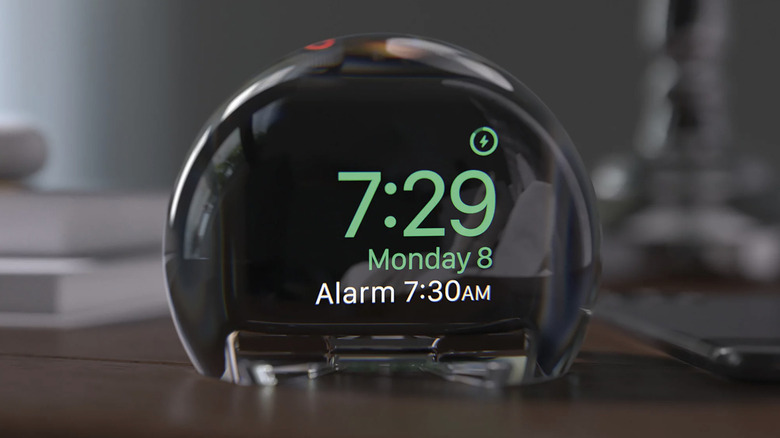
When turning your smartwatch into a desk clock, you'll want to know the important tips to consider before you DIY a desk for a home office. Assessing your desk space and needs will help you choose the right display solution. If the watch will sit far away from you and you want to be sure to see the numbers, then something like the NightWatch Magnifying Clock Dock for Apple Watches available on QVC for $60 could be a good option. Amazon also has many different silicone watch holders that are fit for the task, such as the Elago GW2 charging stand compatible with the Samsung Galaxy Watch for $12. With access to a 3D printer, making your own custom holder is possible using patterns online or by creating your own.
To make your own desk clock, you'll want a watch with an always-on display option. This means that the watch screen displays the time even when it is not on your wrist. Apple, Samsung Galaxy, Garmin, Amazfit, Huawei, and Pixel are all brands that sell smartwatches with this feature. If you are unsure if your watch has an always-on display option, check your watch's manual to learn if it does and how to turn it on.
To put it all together, start by removing the watch band. This will make the result look more like an intentional clock instead of a charging watch. Make sure that the watch is connected to its charger while it is on the stand, and consider using the nifty nightstand essential that keeps charging cords organized and within reach.