

Your Frigidaire Microwave Has A Secret Mute Function

The point of buying a microwave is that it should improve our lives. Feeling hungry in the middle of the night and wanting to heat up leftovers? Microwave. Cuddling in bed with a romantic movie and want a large tub of popcorn to set the mood? Microwave. However, hearing loud, grating beeps every 10 seconds while you're trying to salvage your curry on the side? That's ... not what you had signed up for. After all, you don't want these obnoxious sounds to drown out the opening verse of "Golden" or that long-awaited podcast. Sadly, Frigidaire microwaves don't come with a mute button, but there's a secret function you can use to silence the beeps: Clock Settings.
While most microwave brands provide a "Sound" or "Mute" button, or volume adjustments within their settings, Frigidaire doesn't offer that option on the control panel of many models. This means that unless you're watching the clock and pressing "Stop" or opening the door before it hits zero, you'll have to contend with its repetitive beeping, even from across the room. Fortunately, there are a few ways you can use to put your microwave in silent mode and make your home a little more peaceful. That being said, note that they may not work for every Frigidaire microwave, as configurations vary across different models.
Use Clock Settings to access the secret mute function
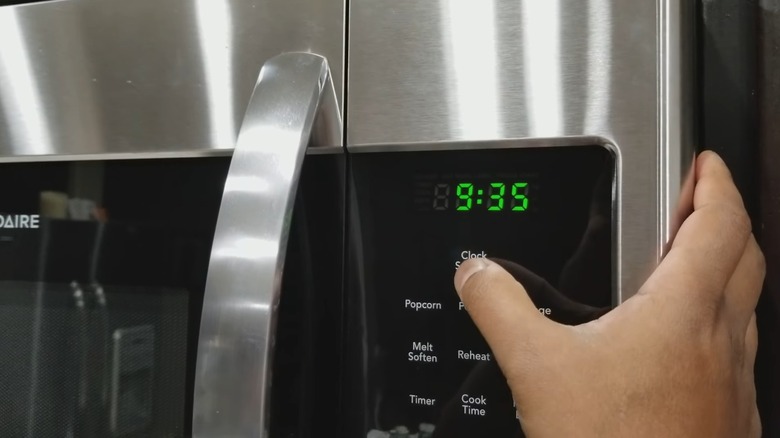
If your Frigidaire microwave has "Clock Settings" on the top of the control panel, here's what you can do to program it into silent or mute mode. Press "Clock Settings" twice in quick succession. Your top display should now change to "oP – 2". Locate the "START" button on the control panel and press it. The display will automatically start rotating through various volume settings. Press "START" as soon as "oFF" appears on the display. Et voilà, you've done it. You've permanently muted your Frigidaire microwave.
However, keep in mind that this will turn off all sound, and this can be a double-edged sword. While you won't have to contend with the non-stop beeps, you'll have no audible confirmation that your control panel has registered all of your commands. And this can be problematic in old models where the panel has started to wear down. Additionally, unless you're nearby, you may not know when the microwave has finished its job. This can be problematic since certain foods may overcook or dry out if they sit in the microwave too long after heating. To deal with this issue, you may have to set a timer or reminder on your phone. The good news is it probably won't be as annoying as the microwave's beeps since you can pick the tone per your liking.
Use user pref or Start options to mute your Frigidaire microwave
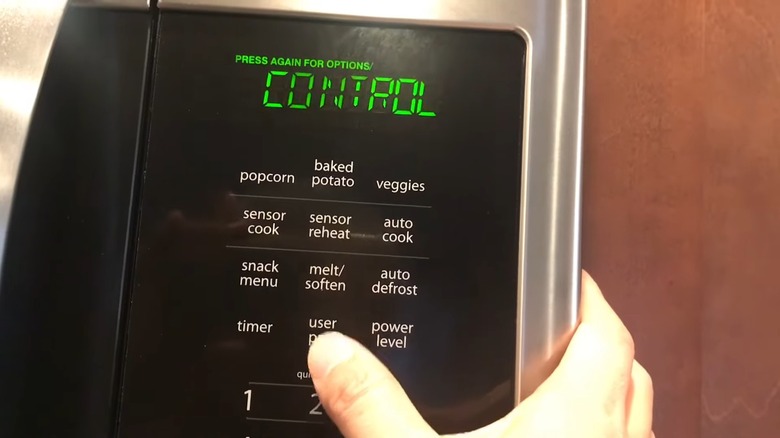
If you have a different model that's missing "Clock Settings," or if the previous method didn't work, check whether your microwave has a "user-pref" button. If so, press it continuously, usually about three times, until the display changes to "VOLUME." Allow it to cycle through the usual settings of Normal, Medium, and High until it displays "ON." At that point, push the "start" button on the control panel. This should toggle off the volume settings, and the display blinking "OFF" should confirm this. Again, this puts your microwave entirely on mute, and not just the reminder beeps.
Another thing you can try, and this comes courtesy of Frigidaire, is long-pressing the "Start" button and counting down to six. The display will make a final grating call, as if in protest, but turn off in accordance with your wishes. However, it only works on certain over-the-range microwave models, and you should confirm compatibility in your product manual. If you have disposed of the manual, look it up online on Frigidaire's website or through a model number search.
Finally, if you have invested in a model that lacks this secret mute function and you're a nifty DIYer, you can try removing the buzzer, the culprit behind the horrendous sound, after taking off the cover. This will most likely void your warranty, though, so proceed with caution. Otherwise, explore some of these kitchen appliance alternatives for replacing your microwave with, to do away with the sound permanently.