

What Does 'FF' Mean On A Refrigerator?

You head to the fridge to make lunch and the moment you open the freezer door, your heart drops. It's not nearly as cold as it should be — it might even be warm. One quick glance at the temperature display panel confirms it: the "FF" error code is staring back at you. Or, in other words, your freezer fan is likely on the blink.
Also known as evaporator fans, freezer fans are responsible for keeping your fridge and freezer at a crisp, cool (or freezing) temperature by moving air over the appliance's evaporator coils, then throughout the unit itself. But when that fan doesn't work properly – perhaps there's ice in the way, the motor is broken, or the fan itself is blocked — your refrigerator can't maintain the needed temperature to keep your food and drinks safe. This can result in that frustratingly obscure "FF" code or even a grinding sound from the freezer, which is a common fridge noise that indicates potential freezer fan issues.
Before you start troubleshooting the "FF" error code, take all your groceries out of the appliance, and store them in another refrigerator or cooler. This will make it easier to examine the fan and diagnose exactly what's going on. You'll also need a flashlight, some towels, and a screwdriver to remove the freezer fan cover.
How to troubleshoot the 'FF' error code on your refrigerator
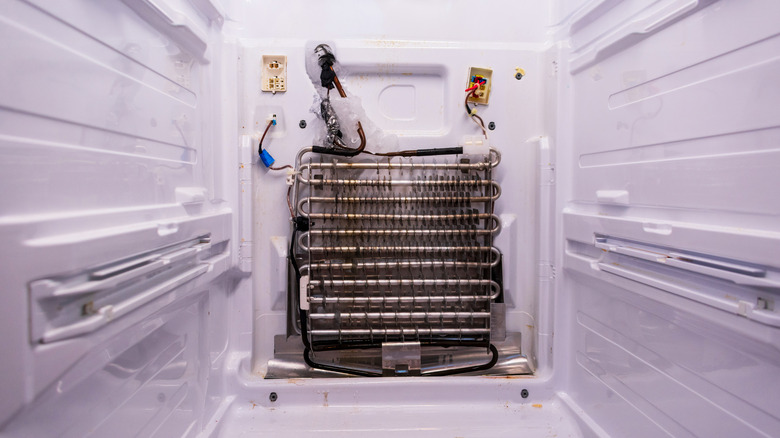
Start by listening for a scraping or grinding sound. This typically means that the fan is working, but is blocked by ice. Check the freezer's back wall, especially along the vents, for ice or frost. If it's there, defrost your freezer to melt any ice blocking the fan by unplugging your fridge and propping open the freezer door. To speed it up, place a bowl of boiling water in the freezer for 30 minutes; make sure to have plenty of towels handy to sop up the water. After defrosting, plug the refrigerator in and let it come back to temperature. Check the temperature panel to see if the code reappears.
If there's no ice buildup in your freezer (or the "FF" code returns), check that the vents are clear. Inspect the freezer door seal for tears or gunk that might keep it from closing properly. Then, unplug your refrigerator to examine the fan (usually found at the back of your freezer). Remove the cover and check the fan for blemishes. Rotate the blades with your finger to see if they move easily. If not, you likely need a new fan motor bearing. Don't see any obvious obstruction? Try a reset: unplug it for five minutes, then plug it back in and check for the error code. If you still hear noise, the freezer is still warm, or you still see the "FF" code, the best way to fix a fridge that isn't cooling properly may be to call in a pro — especially if your appliance is still under warranty.