

What's The Average Lifespan Of A Robotic Lawn Mower?
We may receive a commission on purchases made from links.
Your dreams of basking in dappled sunlight while your robot lawn mower deals with overgrown grass will come to a screeching halt if it sputters out mid-pass. Alternatively, it might return to the charging dock more often than normal or start giving your lawn an uneven haircut. In either case, you may think that your sweet, reliable robot lawn mower has reached the end of its lifecycle. This can be an especially painful pill to swallow if you experience the listed issues within a few months or years of purchase. Naturally, this may have you pondering whether a robot lawn mower is really worth the money. After all, what's the point of a device with an average cost of $1,500 that doesn't let you fully enjoy the rare Sunday sans social obligations? In case you're facing a similar dilemma, know that these machines can have a lifespan of around five to 10 years.
That being said, their various parts have different lifespans. As such, they'll require replacements over the course of your mower's life. To illustrate, some manufacturers recommend replacing robotic mower blades every one to three months during the active grass-growing season. This should help solve your shoddily cut grass problem. Depending on the mower and its battery, replacement may be necessary after several hundred charging cycles. In other words, you might have to spend a good amount of money on a new battery every three to five years. Though you may have to replace it sooner if you need to mow your lawn often or the climate is demanding. Basically, be prepared to spring for about two to three units over the course of your mower's life. However, the actual frequency depends on a few factors.
Factors affecting the lifespan of your robot lawn mower
Your robot lawn mower may experience more wear it's not built to handle your lawn size. For instance, if you have a large area (say, ¾ acre) you'd like it to mow, getting a device with a listed maximum capacity of ¼ acre won't do. Now, you might make this decision to save a few hundred dollars, but the extra work required of an undersized mower could increase wear in the long run. So, to avoid unnecessary wear, always measure your lawn first. Use free tools like Google Earth or get a handheld measuring wheel like Zozen's Collapsible model to make things easier for you. Based on this information, pick a device that has a similar or higher capacity.
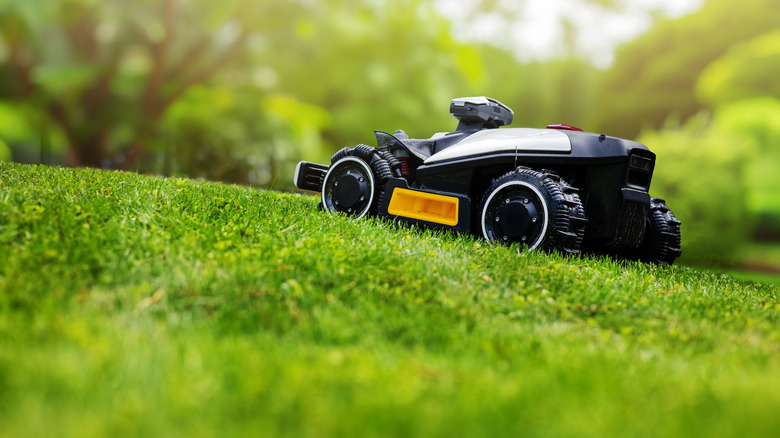
You also want to keep your lawn's terrain in mind. A sloped, uneven, or obstacle-filled surface (think an old tree stump, air roots, furniture strewn about, or rocks placed willy-nilly) will force your mower's motor as well as wheels to work harder. This, in turn, will necessitate more maintenance and upkeep. The frequent charging cycles won't do the battery any favors, either. Plus, how often you mow your lawn will have a direct impact on its lifespan.
You can also adjust the mowing schedule when grass growth slows rather than running the mower more frequently than necessary. Additionally, climate plays a crucial role. If you live in a region that experiences extreme temperatures or there's no rest during winters (like Hawaii or Florida), you'll have to replace the blades and battery sooner than you'd like. Not staying on top of cleaning and maintenance will further wear out parts.
Ways you can extend the life of your robot lawn mower
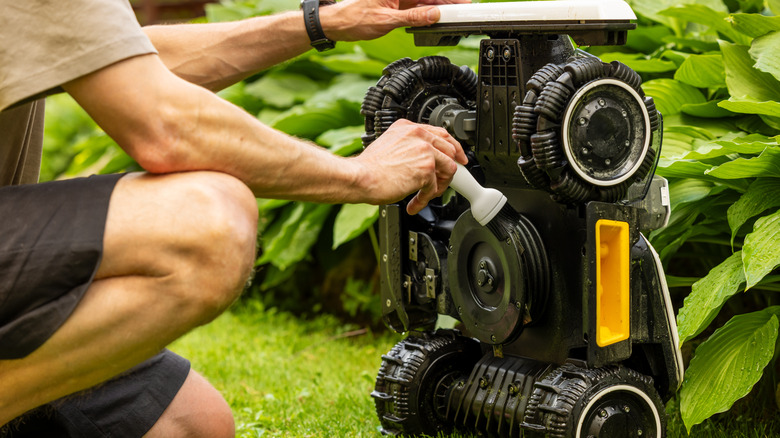
One of the best things you can do for your robot lawn mower is cleaning it regularly. It's essential because otherwise trapped grass cuttings, dirt, and other debris will build up with use. This will make it difficult for your device to breathe properly and put extra strain on the blade disc. Buildup can also interfere with navigation or obstacle-avoidance sensors and charging contacts. The charging points will also get affected. Caked-on mud (especially if you use the mower on damp or wet ground) will negatively impact the wheels as well, as they'll have to push harder to move forward. So, make it a point to brush or rinse away the trapped grime according to the manufacturer's cleaning instructions. Moreover, use a dry microfiber cloth to gently clean the LiDAR sensor, charging contacts, and front camera bi-monthly. Cleansing the cutting deck and wheels off monthly will keep it in tip-top shape.
While at it, check whether it's time to replace the blades. To determine this, look at a section of recently-cut grass. If the grass looks ragged after cutting or the tips begin turning brown, dull blades may be responsible and could be due for replacement. Dull blades can make the mower work harder and may contribute to increased power consumption. Storage is a big consideration, as this cordless tool is one outdoor item you should keep in the shade. Or, exposure to the sun's glaring rays in the summer and freezing winds during winter will have a poor influence on the battery's lifespan. Also, avoid spaces with high humidity and keep the mower's firmware up to date.